How to create a test saved list
Email marketing best practice
You might want to create a test saved list with just you in it, or perhaps a small number of people such as your committee members, or members who will be proofing your emails before they are sent out. To do this, you will need their VANIDS.
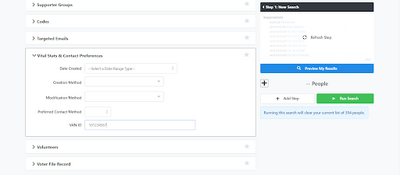
- On Create a List, go to the Vital Stats & Contact Preferences tab. Then enter the VANIDs. If you want to enter multiple VANIDs, you can do so by separating them with commas
- Then you can save it as either a saved list or a saved search